
Let’s be honest. You’ve been there. You stare at the screen, buzzing with a great idea. You type your request into the little AI chat box, expecting some kind of magic.
What you get back is a paragraph so bland, so utterly soulless, it feels like it was written by a committee of bored robots. It’s pathetic. And it’s a waste of your time.
Here’s the hard truth most people don’t want to admit: the problem isn’t the AI. The AI is fine. The problem is your prompt. The quality of what you get out of these incredibly powerful tools is a brutal, direct mirror of the quality and effort you put in. Garbage in, garbage out. It’s that simple.
The good news? This is a fixable problem. Prompting isn’t some dark art you have to be born with; it’s a skill you learn. There are concrete, specific techniques that completely change the game. I’m not talking about fluffy theories. I’m talking about seven specific, actionable changes you can make to your prompts right now to stop getting mush and start getting the sharp, intelligent results you actually want.
If you’re tired of getting useless answers, pay attention.
First, Why Your Basic Prompts Are Failing You
We’ve all been there. You have a brilliant idea, so you turn to your AI assistant and type in a quick request, something like, “Write a blog post about marketing.” What you get back is… fine. It’s a generic, bland, and utterly forgettable piece of text that sounds like it was stitched together from a thousand different encyclopedia entries. It feels like the AI just isn’t very creative or smart.
But the truth is, the problem usually isn’t the AI. The problem is the prompt.
The Problem with Vague Instructions and One-Liners
Think of it this way. If you walked into a restaurant and just said, “Get me some food,” you’d have no right to be disappointed when they brought you a plain bowl of rice. You were vague, so they made a safe, generic choice. An AI model works in a very similar way. A prompt like “write about dogs” is the digital equivalent of asking for “some food.”
The AI has no idea what you really want. Should it talk about different breeds? Training tips? The history of canine domestication? Faced with endless possibilities, the AI will choose the most probable, middle-of-the-road path. This leads to content that is technically correct but lacks any real insight, voice, or purpose.
How AI “Thinks”: Why Context and Clarity are Everything
Here’s something most people miss: an AI doesn’t understand concepts like a human does. It’s a highly advanced pattern-matching machine. It has been trained on billions of articles, books, and websites, and it uses that data to predict what words should come next in a sequence. It doesn’t have experiences or opinions; it has probabilities.
When you provide a clear, detailed prompt, you are giving the AI the context it needs to narrow down those probabilities. You are essentially giving it a map, guiding its predictions away from the generic and toward the specific, high-quality result you have in your head.
Clarity isn’t just a suggestion—it’s the single most important factor for getting expert-level results. Without it, you’re leaving everything up to chance.
Technique 1: The Persona Pattern (Give Your AI a Job Title)

You’ve probably felt this before. You ask the AI for something creative, and the response you get is so flat and boring you can almost hear a dial-up modem buzzing in the background. I know I have. For a while, I thought this was just the limit of the technology.
It wasn’t. The problem was how I was asking.
The fix turned out to be a simple but powerful shift in thinking. I stopped giving the AI a to-do list and started giving it a job. Here’s what I mean. You wouldn’t walk up to a random stranger on the street and ask them to write a legal brief for you, right? Of course not. You’d hire a lawyer. You need to treat the AI the same way—it’s a multitalented stranger until you tell it which expert it needs to be.
So, how does this actually work in a prompt? You just add one sentence at the beginning that gives the AI a role. Don’t just ask it to write about your new product. Instead, tell it: “You are a deeply passionate product designer who obsessed over every detail of this for years. Now, explain what makes it so special.”
That single change forces the AI to filter its response through a specific personality. It’s no longer just spitting out dry facts. It’s channeling a character. The generic language disappears, and a distinct, more believable voice takes its place.
Let’s use a quick example. Say you need a social media post for a new brand of honey.
- A basic prompt would be: “Write a post about our new wildflower honey.” The result? Something you’ve seen a million times. “Try our new honey. It’s sweet and natural.” Nobody will even notice it in their feed.
- Now, let’s give the AI a persona: “You are a folksy, third-generation beekeeper from the mountains with a love for storytelling. Write a short post about the magic of the first honey harvest of the summer.”
The entire energy shifts. You’re no longer getting a bland product description. You’re getting a tiny story. You’ll get words like “sunshine,” “golden,” and “magic,” all told in a warm, authentic voice. That’s the difference between content that gets scrolled past and content that makes someone stop and feel something.
Technique 2: Few-Shot Prompting (Teach with Examples)
Giving your AI a role is a fantastic start. But sometimes, even an “expert” doesn’t have the specific style you have in your head. Maybe their sentences are too long, or the tone isn’t quite right. When this happens, you need to show the AI exactly what you want. You have to give it examples.
Sounds a bit technical, doesn’t it? The official term is “few-shot prompting,” but don’t let the jargon fool you. It’s something you already do in your everyday life. You don’t just tell a new employee to “write good emails”; you show them a few examples of what a good email looks like. You’re giving them a pattern to follow. This is the exact same idea.
When you just give the AI a command, it’s called a “zero-shot” prompt. You’re giving it zero examples. But when you provide a command plus a few perfect examples to copy, it becomes a “few-shot” prompt. This is how you train the AI on your specific style in real-time.
Let’s say you want to reformat customer testimonials into a cleaner style for your website.
- Your “zero-shot” attempt might be: “Rewrite this testimonial: ‘I really love the product, it has been so helpful for my business and I think the quality is just amazing.'” The AI would probably just spit back a slightly rephrased sentence. Not very useful.
- Now for the “few-shot” approach. You teach it first.
Your prompt would look like this: “I’m going to give you a customer quote, and your job is to turn it into a powerful, short testimonial. Here are a few examples:
Example 1:
- Original: “This software is pretty good, I guess. It helps me save time on my projects and stuff.”
- New Version: “This software is a lifesaver. It saves me hours of work on every project.”
Example 2:
- Original: “I was impressed with the customer support, they were very helpful when I had an issue.”
- New Version: “The customer support is second to none. They were incredibly helpful when I needed it most.”
Now, using that same pattern, rewrite this one: ‘I really love the product, it has been so helpful for my business and I think the quality is just amazing.'”
Suddenly, you’ve given the AI a blueprint. It sees the before-and-after pattern and will give you back something powerful like: “The quality is amazing. This product has been incredibly helpful for my business.” You didn’t just ask for a result; you showed it what a perfect result looks like.
Technique 3: Chain-of-Thought (Making the AI “Think Out Loud”)

Let me tell you about a time an AI drove me absolutely crazy. I gave it what I thought was a simple logic problem—one of those puzzles about who sits where at a dinner table. The answer it gave back was not just wrong; it was complete nonsense. It confidently presented a solution that contradicted the very rules I had given it.
What was so frustrating was that I couldn’t see how it failed. The final answer was just… there.
It got me thinking about how we solve problems in the real world. When a student gets a math problem wrong, a good teacher doesn’t just mark it with an X. They say, “Show me your work.” They want to see the process, the step-by-step thinking, to find the exact point where things went off the rails. The AI was like a student just handing in the final, wrong answer, with none of the work shown.
That’s when I discovered the idea of making the AI “show its work.”
The official name for it is Chain-of-Thought prompting, but all it really is is adding a simple, magical phrase to your prompt: “Let’s think step-by-step.”
This tiny addition completely changes the AI’s behavior. Instead of rushing to a final conclusion, it’s forced to slow down and lay out its reasoning one step at a time. This is incredibly powerful for anything that requires logic, planning, or complex reasoning. It forces the AI to check its own work as it goes, which dramatically cuts down on stupid mistakes.
So, I went back to my dinner table puzzle. This time, I wrote: “Here’s the puzzle. Before you give me the final answer, walk me through your reasoning step-by-step.”
The response was like night and day. It started with, “Okay, let’s break this down. From the first clue, we know that Mark cannot sit at either end of the table…” It went through each piece of information, making deductions one by one. And at the end, it arrived at the correct answer. By forcing it to think out loud, I turned it from a flawed answer machine into a genuine problem-solving partner.
Technique 4: Define the Output Format (Tell the AI Exactly What You Want)
You know, it’s funny. We get access to this incredibly complex artificial brain, and yet the biggest reason it fails is usually because of a simple, very human problem: we don’t say exactly what we want.
I learned this the hard way.
I was trying to get an AI to pull key points from a bunch of long, messy meeting transcripts. A total headache. My first few prompts were simple, something like, “Summarize the key decisions from this transcript.” The results were a disaster. One time I’d get a dense, five-hundred-word essay. Useless. The next, I’d get a bulleted list, but the tone would be wildly casual. It was completely random, and I was just burning time.
The thought that finally clicked for me was this: the AI isn’t a mind reader. It has no idea what my definition of a “good summary” even is. I was mad at it for guessing wrong, when I never even told it the rules of the game.
So I changed my approach. I added a new part to my prompt that I literally called “The Rules.” It looked something like this:
“Your task is to summarize the following transcript. Follow these rules precisely:
- Constraint: The entire summary must be under 75 words. No exceptions.
- Tone: Formal and objective.
- Format: Use a numbered list, with each point being one complete sentence.”
It wasn’t fancy. But it worked. Instantly. By creating a clear box for the AI to play in, I took away its ability to guess. I gave it non-negotiable guardrails.
This goes way beyond just word count and tone, too. You can be an absolute tyrant about the structure of the output. I often add instructions like, “The final output must be a valid JSON array of objects,” or “Present this data in a Markdown table with columns for ‘Product,’ ‘Price,’ and ‘Rating.'” When you get that specific, you’re not just asking for information anymore. You’re engineering the exact result you need. It’s the difference between hoping for a good photo and telling a photographer the precise lens, aperture, and lighting to use. One is a wish; the other is a command.
Technique 5: The Flipped Interaction (Get the AI to Ask You Questions)
This next idea is strange. It feels backward at first.
We all use AI the same way. We ask it a question, it gives us an answer. Simple. But you’re putting all the pressure on yourself to ask the perfect question. And that’s hard. Sometimes, impossible.
So what if you flipped it?
What if, instead of you interviewing the AI, you made the AI interview you?
I found this out by pure accident. I was completely stuck trying to create a detailed marketing plan. My prompts were getting longer and more desperate, and the results were just useless, generic mush. On a total whim, I gave up and just typed this:
“I need to create a complete marketing plan for a new mobile app. You are a world-class marketing strategist. Start by asking me questions about my app, my goals, and my budget until you have all the information you need.”
The result was staggering. It completely changed the game.
The AI immediately responded with: “Of course. Let’s build this together. To start, please answer the following: 1. Who is the primary target audience for this app? 2. What is the core problem your app solves for them? 3. What is your estimated marketing budget for the first six months?” It asked ten different questions, each one smarter than the last.
It hit me right then. The biggest struggle in writing a great prompt is transferring all the critical context from your brain into the text box. This trick clears that hurdle. It makes the AI do the hard work of pulling the necessary details from you. You’re no longer a lonely interrogator; you’re being guided by an expert.
So when do you use this? Use it whenever a task feels too big, too complex, or too vague. Use it when you don’t even know what you don’t know. Drafting a contract. Planning a novel. Building a workout regimen. It’s a powerful way to turn a simple tool into a genuine collaborator.
Technique 6: Use Delimiters to Stop Confusing the AI
Alright, I’m just going to say it. If you’re writing prompts that are more than a couple of lines long and you aren’t using delimiters, you are making a mess. A big one.
It’s shocking how many people miss this. They spend hours crafting these beautiful, elaborate prompts. They pour in background context, detailed instructions, multiple examples… and then they just dump it all into the prompt box as one giant, rambling wall of text.
It’s a disaster.
Think about it from the AI’s perspective. It’s an incredibly powerful machine, but it’s also incredibly literal. When it sees that giant block of text, it has to guess where your background information ends and your actual command begins. It has to guess which part is an example to learn from and which part is the task it needs to perform. You are forcing the machine to play a guessing game it is almost guaranteed to lose.
The solution is painfully simple: build fences.
We in the biz call them delimiters. All they are is a clean, consistent marker—like ### or — or even <tag>—that you use to separate the different sections of your prompt. You are literally building a fence between the “context” part of your prompt and the “task” part.
Instead of a messy paragraph, your prompt becomes an organized brief. Like this:
###INSTRUCTIONS### You are an expert copywriter. Your tone should be urgent and exciting.
###BACKGROUND### Our product is a new coffee blend called ‘Fuse’. It has double the normal amount of caffeine. The target audience is tired college students and young professionals.
###TASK### Write three short, punchy Instagram captions for the launch of Fuse.
See? It’s not rocket science. It’s just organization. Suddenly, there is zero confusion. The AI knows its role, it knows the context, and it knows its job. You’ve taken all the guesswork out of the equation. Stop throwing a pile of stuff at the AI and start handing it a neat, labeled set of instructions. It’s the easiest win in all of prompt engineering.
Technique 7: The Iterative Process (Stop Treating It Like a Vending Machine)
Let’s kill a myth right now. The idea of the “perfect prompt” that you type once and get a masterpiece back is a total fantasy. It doesn’t exist. Anyone who tells you they have a secret formula for one-shot perfection is selling you snake oil.
This isn’t a vending machine where you press B4 and a flawless result drops out. It’s a craft. It’s a process.
And yet, the single biggest mistake I see people make, over and over, is giving up after the first try. They’ll carefully write a prompt, get a result that’s maybe 70% of what they wanted, and then they’ll sigh and complain about the limits of AI. That’s madness. That’s like a chef tasting a sauce once, deciding it’s a bit bland, and then just throwing the whole pot in the trash.
The real skill, the thing that separates the amateurs from the pros, isn’t about writing a brilliant first prompt. It’s about what you do next. It’s about refining.
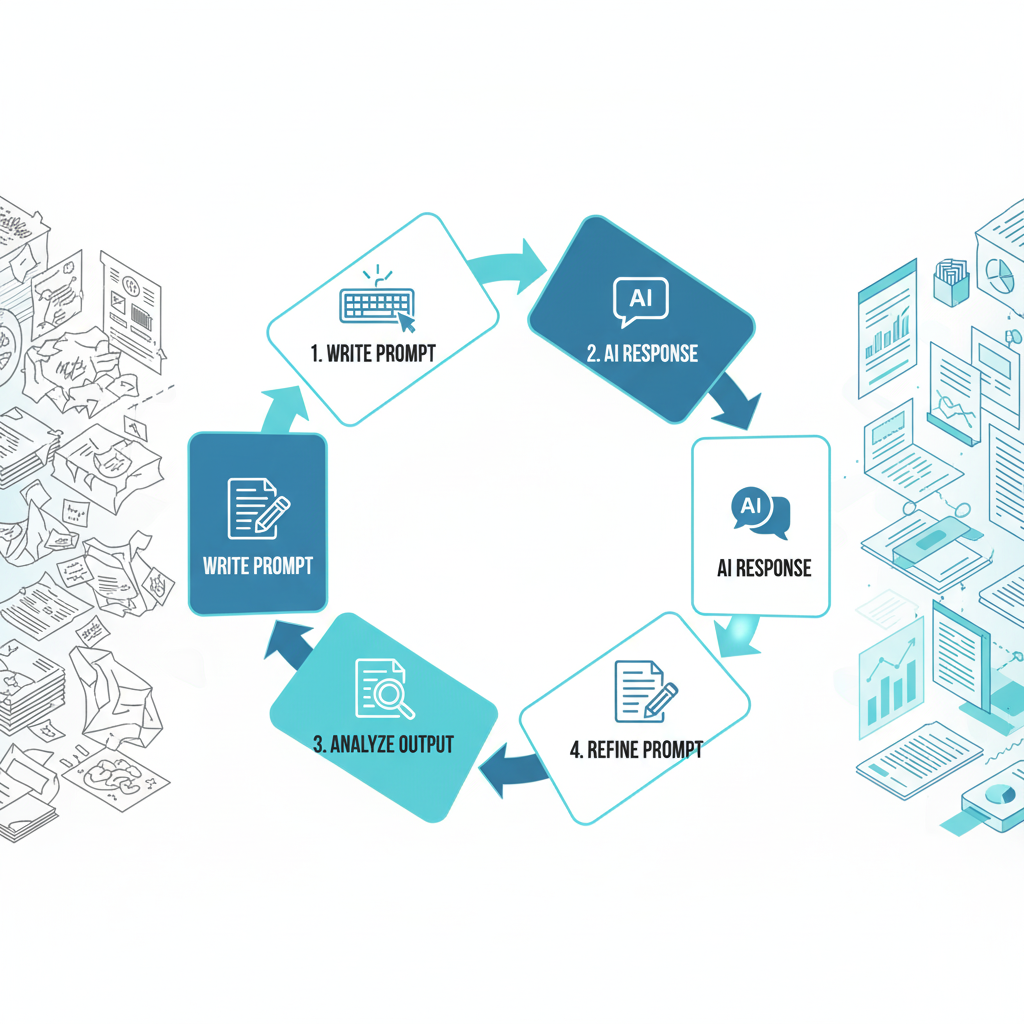
The process itself isn’t some grand secret. It’s almost boringly simple:
- Prompt. You take your best shot. You write the clearest prompt you can.
- Analyze. You get the output back. Now, you read it. And I mean really read it. Be ruthless. Is the tone off? Is the structure weak? Did it miss a key point? Find the specific flaw. Don’t just say “it’s bad”; name the problem.
- Refine. Go back to your original prompt. Don’t just delete it and start over. Find the part that caused the flaw and make one, small, targeted change. Tweak the persona. Add a constraint. Clarify one sentence. Make it a surgical strike.
- Repeat. You run the new, refined prompt. Is it better? Good. Is it perfect? Probably not. So you find the next smallest flaw and you do it again.
That’s the whole game. It’s a loop. Prompt, analyze, refine, repeat. It’s the tedious, unglamorous work of iteration that produces incredible results. You’re not just asking for an answer; you are actively shaping and molding the AI’s output, one small tweak at a time, until it is exactly what you envisioned. Stop looking for the magic words and start embracing the process.
Conclusion: Stop Asking. Start Directing.
So, after all that, what’s the real secret? It’s simple. Stop treating these powerful AI models like some mystical oracle you timidly ask for favors. They aren’t genies. They’re engines. Incredibly powerful, complex engines, but they will sit there idling forever until a skilled driver gets behind the wheel, slams it into gear, and tells it exactly where to go.
Every single technique we’ve talked about—from personas to delimiters to the refinement process—is just another way of saying the same thing: you need to be the driver. You have the context, the vision, and the standards. The AI just has the raw processing power. Your job is to stop being a passenger hoping for a good destination and start being the one who draws the map and plots the course.
So here’s the final takeaway. Don’t just read this and move on. Go find a prompt you used recently that gave you a garbage result. Open it up. Now, rewrite it, but this time, be a tyrant. Be demanding. Assign a ridiculously specific persona, set a brutally strict word count, and fence off every section with delimiters. Take control.
The quality of an AI’s output isn’t a reflection of the AI’s power. It’s a direct reflection of the clarity and authority of the person writing the prompt. Stop waiting for the tools to get better. It’s time for you to get better at using them.
People Also Loving These: 200+ Creative Drawing Prompts to Transform Your Art Skills in 2026



1 thought on “7 Advanced Prompting Techniques the Experts Use for Better AI Results”